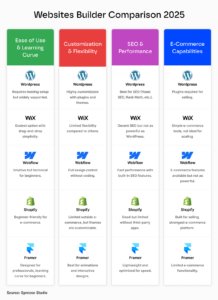
Introduction — The Real Cost of “Free to Start”
You’ve probably heard:
“Just use Wix, it’s easy!”
“Squarespace locks in your design!”
“Webflow is powerful but complicated!”
All true — but none of these tell the full story. When you’re building a serious business website, time, customization limits, long-term costs, performance, and migration options matter as much as initial ease of use. So let’s cut through the hype.
This guide breaks down the best website builder 2026, including migration limitations, real costs, learning curves, and future flexibility, so you can make a confident decision for your business.
Platform Comparison — Pros, Cons, Cost & Migration Reality
1) Wix
Pros
-
Beginner friendly, fast setup
-
Large template library
-
Built-in hosting and support
Cons
-
Closed ecosystem — migrating off Wix is nearly impossible in any practical way (exporting is limited, rebuilding is typical)
-
Template/design restrictions become obvious as needs grow
-
Limited SEO flexibility compared to WordPress
Cost
-
Monthly plans (general range): ~$16–$49+ depending on features and eCommerce add-ons
-
Additional apps often charge extra
Migration Reality
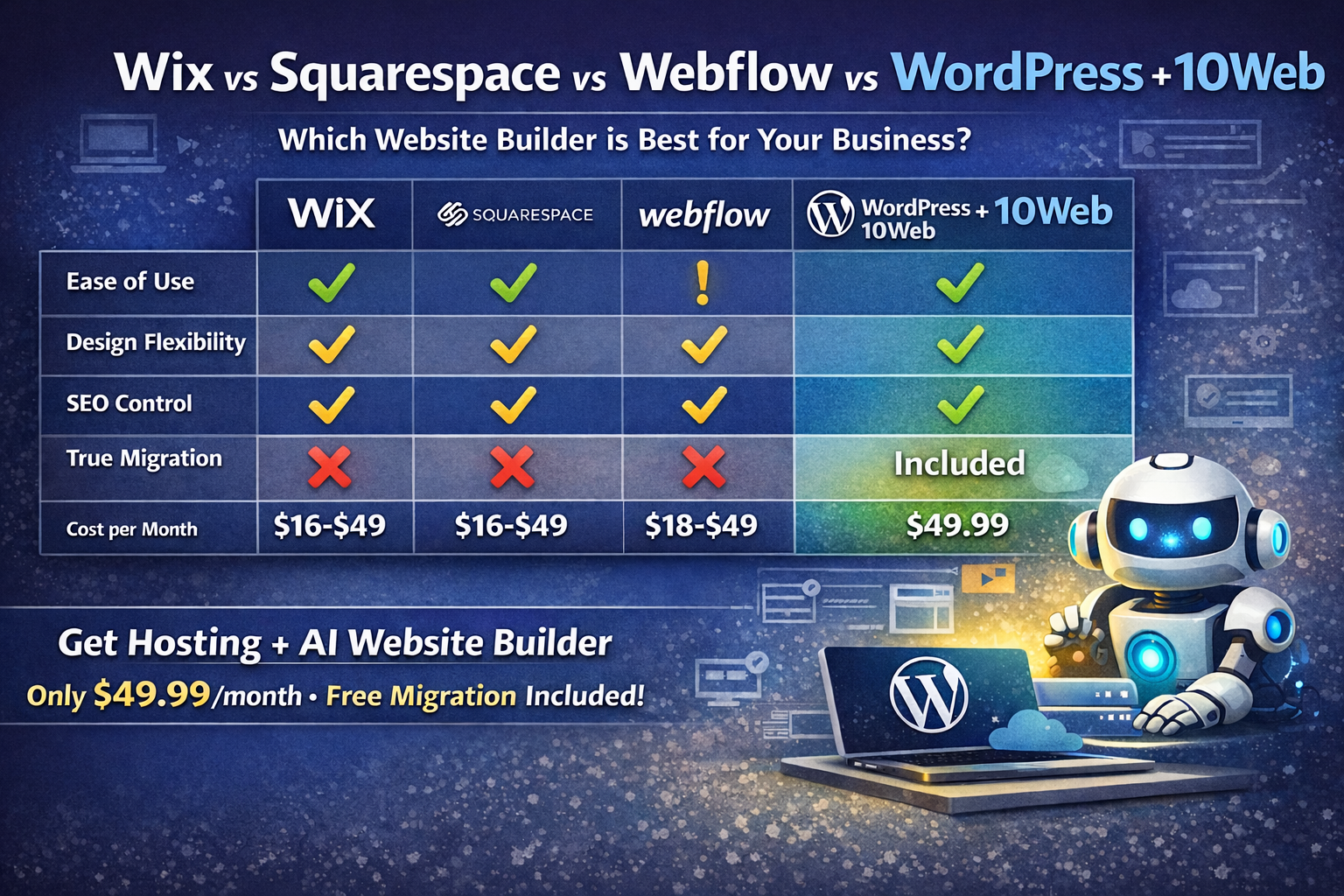
You cannot export your site content and design to another platform. If you ever leave Wix, you rebuild from scratch — not a true migration.
2) Squarespace
Pros
-
Beautiful, polished templates
-
Easy editing and built-in functionality
-
Strong system for portfolios and simple business sites
Cons
-
Not built for deep customization
-
Limited plugin ecosystem
-
SEO and advanced marketing features feel restrictive
Cost
-
Monthly plans: ~$16–$49+
-
E-commerce functions often require higher plans
Migration Reality
Squarespace allows basic content export, but design and layout won’t transfer. Serious business owners should treat migrations as rebuilds.
3) Webflow
Pros
-
Excellent visual control and design precision
-
Strong for developers and designers
Cons
-
Steep learning curve — responsiveness and classes aren’t intuitive for beginners
-
More time investment to launch
Cost
-
Site plans: ~$18–$49+
-
Workspace & team plans for agencies cost more
Migration Reality
Webflow’s CMS export tools are stronger than Wix/Squarespace, but style + visual structure often still must be recreated when moving to another platform.
4) Shopify (when eCommerce is primary)
Pros
-
Leading eCommerce capabilities
-
Built-in payment processing, inventory, POS
Cons
-
Content system isn’t as flexible as WordPress
-
Apps can increase monthly costs
Cost
-
Monthly plans: ~$39–$399+
-
Transaction fees + app costs
Migration Reality
Shopify lets you export products and content, but visuals/design and checkout logic usually need rebuilding on a new platform.
5) WordPress (Self-Hosted)
Pros
-
World’s most flexible CMS
-
Deep SEO control, advanced automation, massive plugin ecosystem
Cons
-
If unmanaged: maintenance overhead (updates, backups, security)
-
You need hosting
Cost
-
Hosting: ~$5–$50+/mo (varies by provider)
-
Themes/plugins: free to premium
Migration Reality
WordPress is portable — content and design can move between hosts or environments with minimal hassle. Well-designed themes and structures transfer cleanly.
Learning Curve + 10Web Advantage
Clean, quick breakdown of difficulty, flexibility, and what you really get long-term. Scroll sideways on mobile to view the full tables.
Learning Curve Breakdown
DIY difficulty| Platform | Easy | Moderate | Hard |
|---|---|---|---|
| Wix | ✔ | ||
| Squarespace | ✔ | ||
| Shopify | ✔ | ||
| Webflow | ✔ | ✔ | |
| WordPress + Elementor | ✔ |
The 10Web + WordPress + Elementor Advantage
The real story| Feature | Wix | Squarespace | Webflow | WordPress alone | 10Web + Elementor |
|---|---|---|---|---|---|
| Fast Startup | ✔ | ✔ | ✔ | ✔ AI | |
| Design Flexibility | ⚠ | ⚠ | ✔ | ✔ | ✔ |
| Ownership | ✖ | ✖ | ✖ | ✔ | ✔ |
| Scalability | ⚠ | ⚠ | ✔ | ✔ | ✔ |
| SEO Control | ⚠ | ⚠ | ✔ | ✔ | ✔ |
| True Migration | ✖ | ✖ | ⚠ | ✔ | ✔ |
| Managed Hosting Included | ✔ | ✔ | ✔ | ✖ | ✔ |
| AI Website Generation | ✔ | ||||
| White-Label Builder (for agencies) | ⚠ | ✔ |
Stop Renting Your Website. Start Owning Your Platform.
Most builders lock you into their ecosystem and raise prices as you grow. Semper Fi Design gives you WordPress ownership, AI-powered speed, and managed hosting — without the headaches.